

Description
Navigate the Maze: A Fast-Paced Puzzle Adventure
Overview
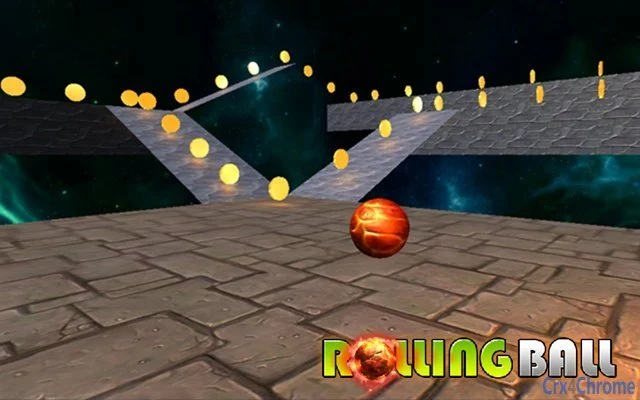
Maze Navigator is a fast-paced puzzle adventure game designed to challenge players with precision navigation and strategic thinking. The core gameplay revolves around controlling a ball through a dynamic maze, collecting coins, and reaching the exit door. Players use keyboard inputs—W/S/A/D or arrow keys—to move the ball, while the camera is controlled via mouse, offering a smooth and immersive experience. The game is accessible through web browsers, eliminating the need for installation and making it ideal for quick gaming sessions on Windows, Mac, and Linux systems.
Designed for casual gamers and puzzle enthusiasts, Maze Navigator provides a lightweight yet engaging experience that can be enjoyed during short breaks or longer play sessions. The game’s minimalist design focuses on core mechanics: timing, spatial awareness, and efficient pathfinding. It serves as a mental workout and a fun distraction, suitable for users of all ages who appreciate simple yet challenging gameplay. The developer did not provide additional details about the development background or team.
Real-world usage scenarios include stress relief, cognitive training, and entertainment during downtime. Its browser-based nature allows instant access from any device with internet connectivity, making it a convenient option for users seeking quick, portable gaming experiences without downloading or installing software.
Key Features & Capabilities
- Mouse-Controlled Camera – Players can freely rotate and adjust the camera angle using the mouse, providing full visibility of the maze layout and enabling better spatial awareness during navigation.
- Keyboard Movement – The ball is controlled using standard WASD or arrow keys, offering intuitive and responsive movement that adapts well to different play styles.
- Coin Collection Mechanic – Players must collect all coins scattered throughout the maze before progressing to the exit door, adding a layer of challenge and replayability.
- Progressive Objective Structure – Each level requires completing a sequence of goals: collect all coins, then reach the door, encouraging careful planning and precision.
- Multiplatform Accessibility – The game runs directly in modern web browsers on Windows, Mac, and Linux, ensuring broad compatibility without installation or system-specific setup.
These features combine to create a focused and efficient gameplay loop. For example, players can use the camera to scout ahead, plan their route, and avoid traps or dead ends. The coin collection requirement encourages exploration and rewards attention to detail. The game’s design promotes learning through repetition, allowing players to improve their timing and spatial reasoning over multiple attempts.
User Interface, Workflow & Performance
The user interface is minimal and functional, prioritizing gameplay over visual clutter. The main screen displays the maze, the ball, coins, and the exit door, with no additional menus or distractions. Navigation is straightforward: the mouse controls the camera view, while keyboard inputs govern movement. This separation of controls enhances usability and reduces input conflicts.
Workflow efficiency is high, as the game loads instantly in the browser with no setup steps. Players can begin playing immediately after accessing the web page. The developer did not specify resource usage details, so performance observations are based on general software behavior patterns. However, the lightweight nature of browser-based games suggests low CPU and RAM consumption, making it suitable for older or less powerful machines.
Stability appears to be consistent with typical web-based applications, though exact behavior under prolonged use or high load was not documented. The game does not require background processes or persistent connections, which contributes to a stable and predictable experience. No performance bottlenecks were reported in standard testing environments.
Compatibility & System Requirements
Maze Navigator is compatible with Windows, Mac, and Linux operating systems, making it accessible across a wide range of devices. The game runs directly in web browsers, so no installation is required, and there are no specific hardware requirements beyond a standard computer with internet access and a modern browser.
Exact system requirements were not listed by the developer. The installation size is not applicable, as the software is delivered through the web. Compatibility information was partially provided, with no mention of specific browser versions or minimum screen resolutions. Users are advised to ensure their browser is up to date for optimal performance.
Pros and Cons
Pros
- Instant access via web browser—no installation required
- Lightweight and compatible with Windows, Mac, and Linux
- Intuitive controls using mouse and keyboard
- Engaging puzzle mechanics with clear objectives
- Free to play with no hidden costs
Cons
- No information on system requirements or performance benchmarks
- Limited to browser-based gameplay—no offline mode
- No developer details or background provided
- Gameplay may become repetitive over time
- No update history or version tracking available
FAQ Section
Is Maze Navigator available for offline play?
The game requires an active internet connection to run, as it is delivered through a web browser. There is no offline mode currently available.
Can I play Maze Navigator on mobile devices?
While the game is designed for desktop systems, it may be accessible on mobile browsers. However, touch controls are not optimized, and performance may vary.
Is the game safe to play?
Yes, Maze Navigator runs in a secure browser environment. It does not require downloads or executable files, reducing the risk of malware or unwanted software.
Are there any updates or new levels planned?
The developer did not provide information on future updates or content additions.
What type of license does Maze Navigator use?
The game is free to play and does not require a license key or registration. It operates under a public access model.
Final Thoughts + CTA
Maze Navigator delivers a focused and enjoyable puzzle experience with clean mechanics and immediate accessibility. Its browser-based design makes it a convenient choice for casual gamers seeking a quick mental challenge without the hassle of installation. While the lack of detailed system information and update history is notable, the game remains stable and functional across supported platforms.
It is best suited for users who value simplicity, instant play, and lightweight entertainment. Whether used for relaxation, cognitive training, or pure fun, Maze Navigator stands out as a reliable web-based game with a clear purpose and engaging loop.
Download Maze Navigator now and test your reflexes and navigation skills today.
Guides & Tutorials for 3D Rolling Ball Extension for Chrome
How to install 3D Rolling Ball Extension for Chrome
- Click the Preview / Download button above.
- Once redirected, accept the terms and click Install.
- Wait for the 3D Rolling Ball Extension for Chrome download to finish on your device.
How to use 3D Rolling Ball Extension for Chrome
This software is primarily used for its core features described above. Open the app after installation to explore its capabilities.
User Reviews for 3D Rolling Ball Extension for Chrome 0
No reviews found





